


How internal linking impacts your website's SEO

Promoting a website requires ongoing internal and external linking. Various elements play a role in ensuring successful SEO optimization of a website, among which are internal links. It is hyperlinks that lead from one page of the website to another. Setting up a system of such links on a web resource forms internal linking.
In this article, I propose to take a closer look at what internal linking is and how it affects the SEO optimization of a website.e.
What is the internal linking of a website?
Internal linking of a website or internal links is the process of linking pages of one resource through the placement of hyperlinks between them. Such links help to organize a more convenient structure of the website for users so that they can easily find the information they need. Also, linking helps search engines better understand the structure of the website and the relationships between different pages.
In the first case, the advantage for you is increased customer loyalty on the website and the time of visiting the resource. In the second, the site is better indexed and ranked in the search results (SERP).
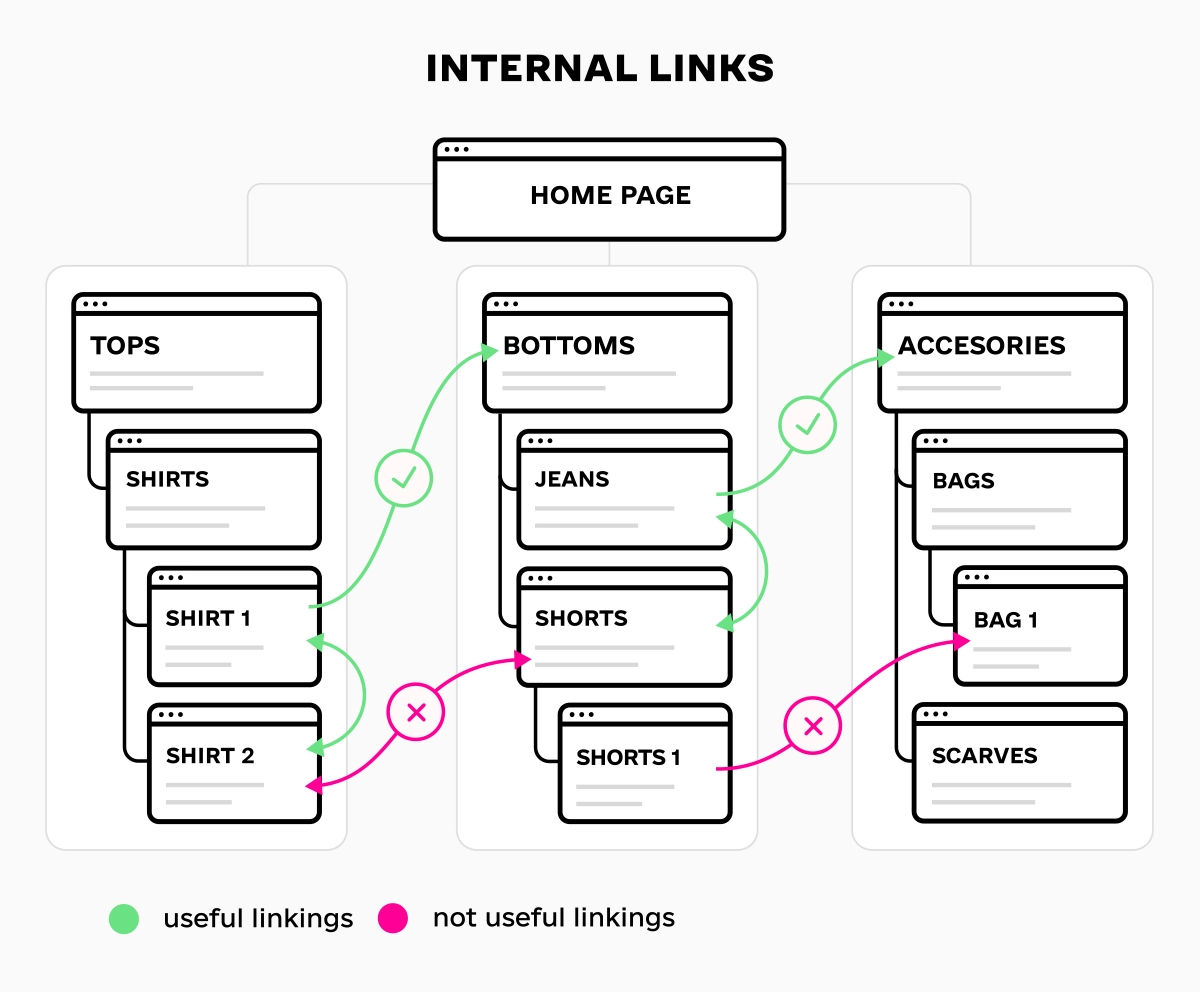
Internal linking is a necessary part of the overall SEO optimization of a website, as it directly affects the pages' issuance in Google SERP, increasing their depth of view and accelerating the indexing of new content.
How internal linking affects SEO optimization
Now that you understand how vital internal linking is for SEO optimization let's take a look at how internal links affect a website:
1
Improved page authority.
Increasing the number of external and internal links pointing to a website improves the authority metrics of the resource for search engines.
2
Increasing the relevance of queries.
Using anchor text allows you to increase the relevance of the material for a specific keyword query.
3
Increased indexing speed.
Quality internal linking on a website speeds up indexing by scanning primary pages by search engines, which leads the search engine to other sections of your site.
4
Improved usability.
Websites with complex structures can be inconvenient for users. Using internal linking helps to simplify navigation around the site, making it more comfortable and understandable.
5
Reduced bounce rate.
Bounce rate is important for promoting a website in the search results. A bounce is defined if a user visits one page of the resource and closes it. Using internal linking increases the likelihood that a potential customer will move on to other pages and become interested in the brand.
Internal links help search engines better understand its structure and index all pages, which has a positive impact on the visibility of the web resource in search results.
You can check the number of indexed pages on your website yourself using a simple command. Just enter the search query "site:(your domain)" in your browser and view the approximate number of results. These will be the indexed pages of your resource.

Types of internal linking
The use of an internal link network within a website implies the reversal of various links.
Navigational and contextual (or in-text links) internal linking
Let's take a look at the pros and cons of each type.
Navigational internal linking
Navigational internal links are placed on all website pages, most often in the menu, category list, or blog, and link to the same pages. These links can provide logical order and navigation for a website.
If your website has many pages and you create internal linking between them with selected keywords, navigational links can help improve the indexing of the resource by search engines and increase its visibility in search results.
Pros
- Easy to create, as they are not dependent on the content of the current page
- Effective for creating a menu or website navigation
Cons
- Not effective for SEO optimization and website promotion
- May not be relevant to the content of the current page
Contextual internal links
Contextual internal links are links that are placed in the text of a page that lead to other relevant pages. For example, in a blog post, you could include a sentence like "For more information, please read this article," linking to another page that would help the user find the answer to their question.
Contextual internal links help to establish relationships between pages, improve indexing and ranking in search engines, and affect the depth of exploration.
Pros
- They are the most effective for SEO because they help search engines understand the structure of the site and the relationships between different pages.
- Look natural as they correspond to the content of the current page
Cons
- More difficult to create because links depend on the content of the current page
Links should be naturally integrated into the text so they do not look like obvious commercial or manipulative links.
Please don't use too many links on one page, as it will look intrusive and affect readability. See the example below to see what it looks like.

It is unlikely that visitors will find this text helpful or exciting, so they will go to another resource that will provide a more detailed and clear answer. You will lose a potential customer for your business.
Manual and automatic linking
Let's take a closer look at each type and their pros and cons.
Manual linking
Manual linking is a time-consuming and labor-intensive process that allows you to control the correctness of the anchor text independently, the correct distribution of text around the links, and the type of links themselves (they must be relevant). Manual linking is used during the comprehensive filling of the site with texts.
Pros
- Used to create contextual links that are effective for SEO
- Allows you to precisely control where and how links will be placed
- Helps you create links that lead to the correct pages
Cons
- May be impossible when you need to cover a large number of pages on a large website.
Auto-linking
Automatic linking allows you to create links between website pages using special plugins and scripts. These plugins typically make the process of creating a main menu, sitemap, individual sections, blog posts, and others easier. This is because, if the resource provides for the placement of various information, the content will be constantly updated or changed.
Pros
- Saves time
- Covers all pages on a website
- Creates different types of links, expanding internal linking
Cons
- Can lead to errors if not properly configured
- Does not allow you to create contextual links, which are necessary for SEO optimization of a website
Anchored and unanchored linking
Let's take a closer look at their features and differences, as well as their advantages and disadvantages.
Anchored linking
Anchored linking is a type of internal linking in which the link contains text that describes or explains the page it leads to. Anchored links allow you to not only direct the user to another page, but also indicate what exactly they can expect there thanks to the keyword query. They guarantee a significant increase in the relevance of the content to specific keywords.
Pros
- Help with SEO promotion of a website
- Look natural
- Help to increase CTR
Cons
- Can be difficult to create, as it is necessary to correctly determine the text for the anchor
Unanchored linking
Unanchored linking involves placing hyperlinks to pages in neutral simple words (read here, source, on the site). You can also insert a URL link directly into the text, but users will not understand what the page the link leads to is about. Therefore, it is worth using around-anchor text.
Pros
- Easy to create
- Immediately show where they lead
Cons
- Ineffective for SEO promotion of a website
- Can be difficult to add organically to the text
Choosing between anchored and unanchored linking depends on your specific goals. If you want to create effective SEO linking, anchored linking is the best option.
What you need to know about internal linking: tips from content strategist Olga Svichkar
SEO promotion of projects of various directions helps to clearly see which strategies and methods search engines respond to better. For the correct construction of internal linking, I recommend paying attention to the following nuances:
- Do not use "broken" links (links to non-existent pages), as they spoil the reputation of the resource;
- Choose unique anchors for contextual links;
- Monitor the main mass of links - do not make a large number of links to one article, gradually add links to different sections of your website.
- Avoid link spam, as search engines closely monitor this and can lower your website's ranking;
- Connect only relevant pages that are similar in content and help to reveal the main topic of the current page.
Based on my own experience, I can say that despite the high usefulness of internal links, to bring the site to the TOP of the search results and maintain positions, it is worth using external and internal links in a comprehensive manner. For this, you need to plan a budget for monthly link building services, which you can read in detail on the page of services for increasing external links on my website.
FAQ
What is internal linking?
Internal linking is the creation of a network of links within a website that connect relevant pages of that resource. It is one of the methods of internal SEO optimization of a resource, thanks to which a logical structure of the site is built and navigation is improved.
How do internal links affect website positions in search engines?
How does internal linking help users on the website?
I propose a development individual content strategy for the development of your site - contact me so that we can discuss your project and I will offer a list of services according to your budget.
articles

 8656
8656

What you can find in this copywriting blog
I am constantly following the latest news in the world of online marketing, so here I share articles that cover various areas of it.
 English
  Ukrainian